
Type the address the site needs.
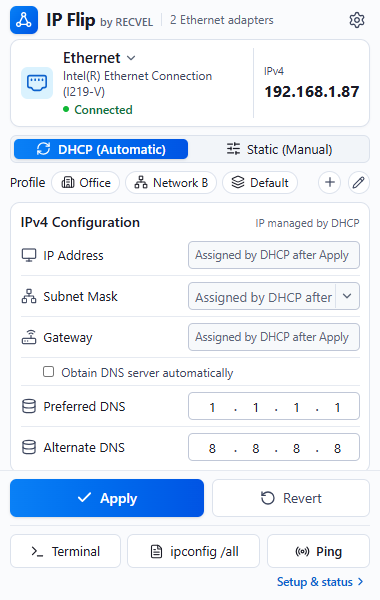
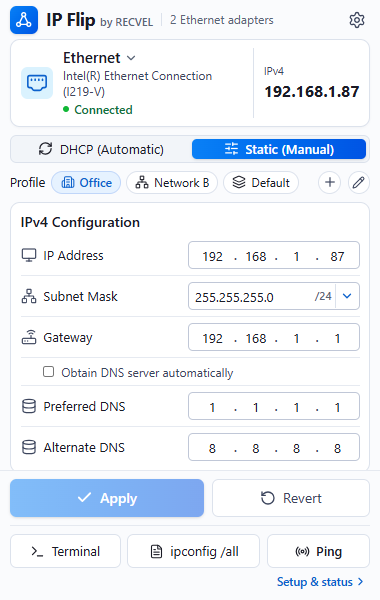
Address, gateway and DNS each get four octet boxes. The mask sits beside its prefix, and saved network profiles are available above the form.
Quick access to Ethernet settings, profiles, and diagnostics — without digging through Windows menus.
For Windows 10 and 11. A Chrome extension with a Windows Companion on the PC.
Private alpha. Public download isn't available.
Four real screens from the extension, with demo test data. Scroll past them, or pick one.
Other views: DHCP, CIDR menu, ipconfig /all.
Address, gateway and DNS each get four octet boxes. The mask sits beside its prefix, and saved network profiles are available above the form.
Switch to DHCP (Automatic) and the address fields say what happens next: assigned by DHCP after Apply. Nothing changes until you press it.
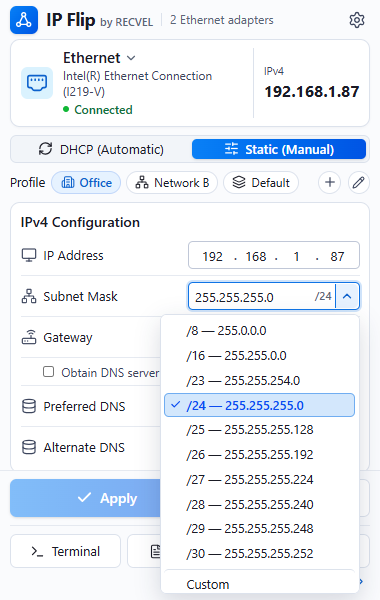
The subnet menu pairs each prefix with its dotted mask — /8, /16, and /23 through /30 — with Custom for anything else. New static drafts start at /24.
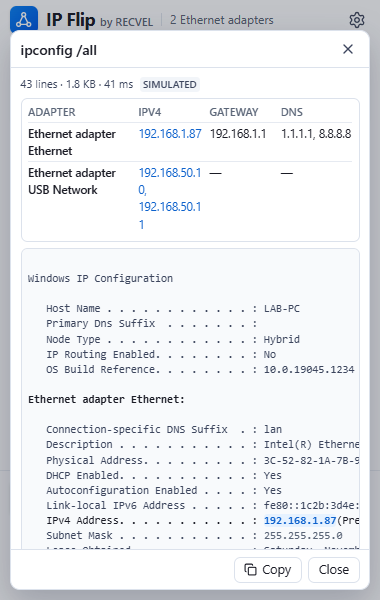
ipconfig /all without hunting.A summary of every adapter sits above the full output, and IPv4 address text is picked out in blue. Highlighting the whole address line is planned for a later release.
Captured from alpha.9’s local visual tests with simulated adapter data. Alpha.9 captures keep the earlier app icon; this website uses the approved IP Flip mark. Later builds may differ. These are images: nothing here talks to the extension, the Companion, or your adapter.
Use static settings when a network calls for them, then return to DHCP when you're done. The addresses below are examples, not network recommendations.
Give your computer a compatible static IP to work with another device on its local network. Save the profile for future use.
192.168.10.20/24
Keep separate settings for different networks, with your adapter and saved profiles in one place.
192.168.20.20/24
When you're done with static settings, return to automatic addressing so the next network can provide an IP.
DHCP
A browser extension can’t change a network adapter on its own. IP Flip splits the job in two, and both halves run on your PC.
Public installation stays closed while real-hardware recovery and the Windows install and signing flow are validated. Read the release requirements.
Public download isn't available. It opens once real-hardware testing, Windows signing and the owner’s go-ahead are all in place.
Download status